



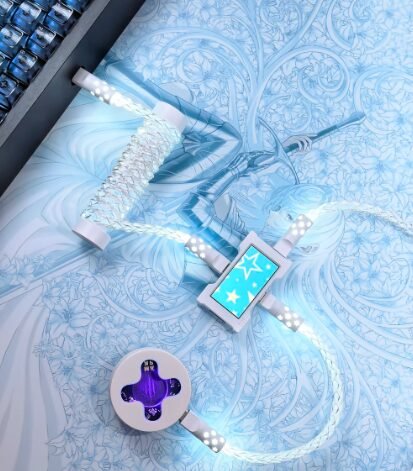
The coiled keyboard cable with a detachable aviator connector has become the defining aesthetic accessory of the mechanical keyboard community. You’ve seen them in build photos — the tight spiral of colorful cable connecting through a metal coupling to a USB-C end.
But are they just for looks? Or do they actually serve a purpose? Here’s everything you need to know before buying a coiled keyboard cable.
What Is a Coiled Keyboard Cable?
A coiled keyboard cable is a USB cable with a tightly wound spiral section, typically in the middle. This gives it a spring-like appearance reminiscent of old telephone cords — but in vibrant colors and premium materials.
Most enthusiast coiled cables also include a GX16 aviator connector — a metal, threaded coupling that allows the cable to disconnect into two pieces.
Why Are They So Popular?
1. The Look
Coiled cables create clean lines on your desk. The coil sits naturally in a loop, keeping the cable off your typing area while adding a retro-futuristic aesthetic. They’re the most photographed accessory in the keyboard community for a reason.
2. Detachable Convenience
The aviator connector means you can unplug the cable from the aviator (not from your keyboard or computer) and stash the keyboard away. This is incredibly convenient if you:
· Switch between multiple keyboards
· Take your keyboard to work and back
· Photograph your build frequently
3. Space Efficiency
The coil acts as a spring that keeps the cable naturally coiled. This means less cable on your desk compared to a straight cable of the same reach, and no dangling loops.
4. Reduced Port Wear
With the aviator connector, you’re plugging/unplugging the aviator rather than the keyboard’s USB-C port. This extends the life of your keyboard’s connector.
Coil Types and Styles
Standard Coil
· Coil length: 6–8 inches
· Straight ends: 6–12 inches on each side
· Look: Classic spiral, medium tightness
Tight Coil
· Coil length: 4–6 inches
· Tighter wraps: More coils per inch
· Look: Very dense, almost like a spring
Loose Coil
· Coil length: 8–12 inches
· Wider spacing: Fewer coils per inch
· Look: Relaxed spiral
Double Coil (The “Guts” Coil)
· Two coils with an aviator in the middle
· Look: Complex, showstopper aesthetic
· Practicality: More weight, more drag
Aviator Connectors Explained
The aviator connector (GX16) is a circular, threaded connector originally used in aviation electronics. It was adopted by the keyboard community because:
1. It looks incredible — The metal housing and threaded collar are visually satisfying
2. It’s modular — You can swap the keyboard-end cable without unplugging from your computer
3. It’s secure — The threaded lock keeps the connection from pulling apart
Common Aviator Sizes
· GX16 4-pin — Standard for keyboard cables (power + data + 2 ground)
· GX16 5-pin — Used for cables with additional shielding
· GX12 — Smaller diameter, less common
· GX20 — Larger, heavy-duty
Aviator Finishes
· Silver — Standard metal, matches most setups
· Black — Sleek, matches dark builds
· Gold — Premium look
· Painted/Anodized — Color-matched to your cable
USB Connector Types
The end that plugs into your keyboard typically comes in these options:
| Connector | Used By | Notes |
| USB-C | Most modern keyboards (Keychron, GMMK, etc.) | Current standard |
| Micro-USB | Older keyboards (Ducky, Varmilo, etc.) | Less common now |
| Mini-USB | Vintage/custom builds | Rare |
| Lightning | iOS devices | For iPad keyboard use |
Most new keyboards use USB-C. Double-check your keyboard’s port before ordering. All our keyboard cables clearly state compatible connector types.
Are Coiled Cables Right for You?
Yes, if:
· Your keyboard sits on your desk (not on a tray or stand)
· You value aesthetic customization
· You frequently disconnect/reconnect your keyboard
· You want the coiled cable look
Maybe not, if:
· You game competitively (coiled cables add slight weight/drag)
· Your keyboard is on a pull-out tray (coil gets caught)
· You need to move your keyboard far from your computer often
· You strongly prefer minimal weight and drag
How to Choose Your First Coiled Cable
Step 1: Check Your Keyboard Port
Is it USB-C, Micro-USB, or Mini-USB? Check your keyboard’s specifications.
Step 2: Pick Your Color
Choose a color that matches or complements your keycaps. Common pairings:
· White cable + white/beige keycaps — Clean, minimalist
· Black cable + any build — Safe, always works
· Color-matched cable + accent keys — Maximum aesthetic
Step 3: Choose Coil Direction
· Straight exit — Cable comes straight out of the keyboard
· Left exit — Cable curves to the left (most popular for right-handed mice)
· Right exit — Cable curves to the right
Step 4: Select Length
· Standard desk setup: 3 feet total with 6–8 inch coil
· Tower on desk: 5–6 feet total
· Under-desk mount: 6–8 feet total
Price Guide
| Type | Price | Quality |
| Amazon basic coiled | $10–20 | Decent but thin coil |
| Entry-level custom | $25–40 | Good coil, basic connectors |
| Mid-range custom | $40–60 | Great coil, metal aviator |
| Premium handmade | $60–100+ | Perfect coil, artisan connectors |
Maintenance Tips
· Don’t stretch the coil more than 3× its length — You’ll permanently deform the spiral
· Store without tension — When not in use, let the coil relax
· Clean the aviator contacts — Use a dry cloth on the GX16 pins every few months
· Avoid twisting — If the coil is twisting, hold both ends and rotate gently to even it out
The Verdict
Coiled aviator cables are primarily an aesthetic upgrade — but they’re a practical one too. The detachable aviator connection genuinely improves daily keyboard use, and a well-made coiled cable adds durability that stock cables lack.
If you care about how your desk looks and spend time on your keyboard build, a coiled cable is the finishing touch that ties everything together.
____________________________________________________________
Ready to buy your first coiled cable? Browse our collection of keyboard cables with multiple colors, connector types, and coil options.